私たちが日常的に利用している「ウェブ」の正式名称はWorld Wide Web(ワールド・ワイド・ウェブ)であり、一般的にWWWやW3と略されます。多くの人がインターネットと混同しがちですが、実際にはインターネットという巨大な通信基盤の上で動作する一つのアプリケーション層プロトコル(通信規約)に過ぎません。
ウェブの登場により、テキストや画像などの情報をハイパーリンクで結びつけ、世界中のどこからでも簡単にアクセスできる情報空間が実現しました。現代のデジタル社会を支えるこのシステムの成り立ちと構造について詳しく解説します。
Key Facts
- 誕生: 1989年にティム・バーナーズ=リーによって考案され、1991年8月6日に初めて公開された。
- 開発拠点: 欧州原子核研究機構(CERN)で開発が始まり、後にW3Cが標準化を主導。
- ライセンス: 1993年4月よりパブリックドメインとなっており、誰でも無料で利用可能。
- 基本構造: HTML(言語)、HTTP(通信プロトコル)、URL(識別子)の3要素で構成される。
- 進化: 静的なページから、サーバー側で処理を行う動的なページへと発展した。
ウェブの誕生と歴史的背景
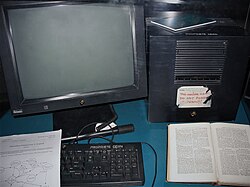
WWWは、1989年にCERNに勤務していたティム・バーナーズ=リーによって設計されました。彼の目的は、研究者間での効率的な情報共有を可能にすることでした。世界初のウェブサーバーとして使用されたのは、当時のNeXTコンピュータでした。
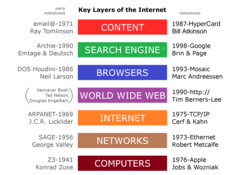
初期のウェブには、ロバート・カイリューが設計したロゴが存在していましたが、現在は世界的に統一された唯一のロゴは採用されていません。1990年代に入ると、画像やGIFアニメーションの表示を可能にした「Mosaic」などのブラウザが登場し、ウェブの利便性と視覚的な魅力が飛躍的に向上しました。

ウェブを構成する基本メカニズム
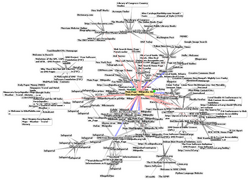
ウェブの最大の特徴は、ハイパーリンクによる情報の連結です。これにより、ユーザーは関連するドキュメント間を自由に移動することができます。この構造は、網の目のように張り巡らされた巨大なグラフとして表現されます。
ウェブページの種類
ウェブ上のコンテンツは、大きく分けて2つの形式に分類されます。
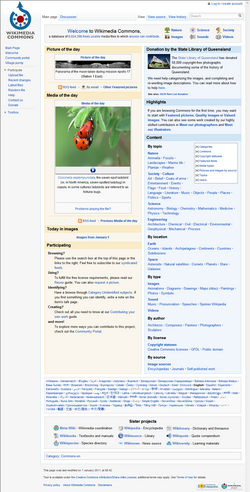
- 静的ページ: サーバーに保存されているファイルがそのままクライアント(ブラウザ)に送信される形式。内容が固定されており、更新にはファイルの書き換えが必要です。
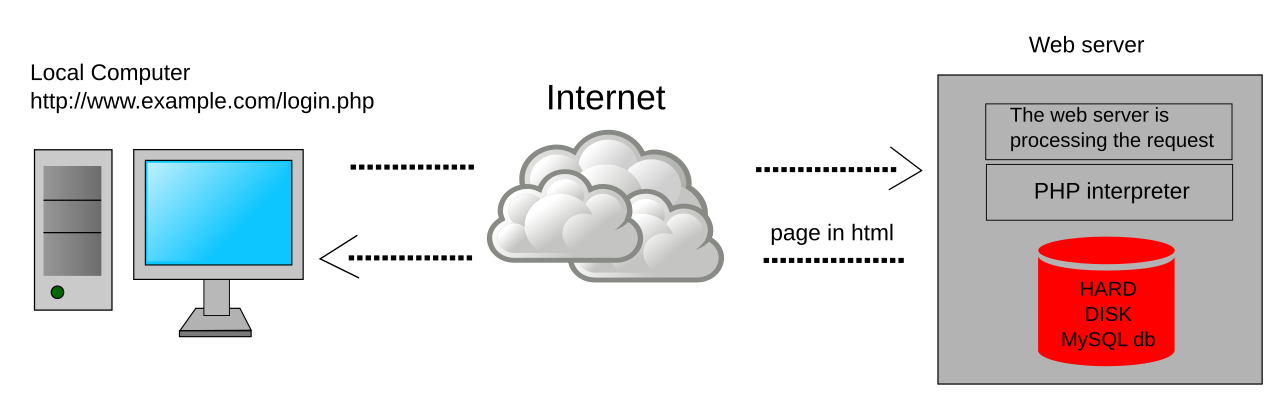
- 動的ページ: PHPやMySQLなどのサーバーサイドスクリプトを用いて、リクエストに応じてリアルタイムにコンテンツを生成する形式。ユーザーごとに異なる情報を表示させることが可能です。
ウェブサイトとサーバーの役割
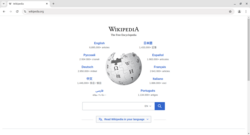
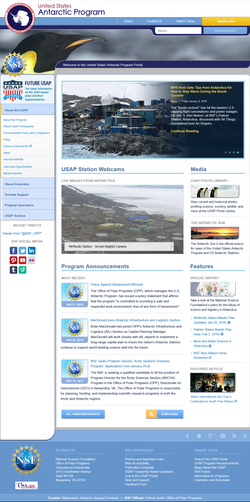
個別のページが集まって一つの「ウェブサイト」を構成します。これらのデータを保持し、リクエストに応じて配信するのがウェブサーバーです。小規模なサイトでは一台のサーバーで十分ですが、Wikipediaのような膨大なトラフィックがあるサイトでは、ラックマウント型の高性能サーバーを複数台組み合わせたクラスター構成が採用されています。


ウェブの利用を支える技術とツール
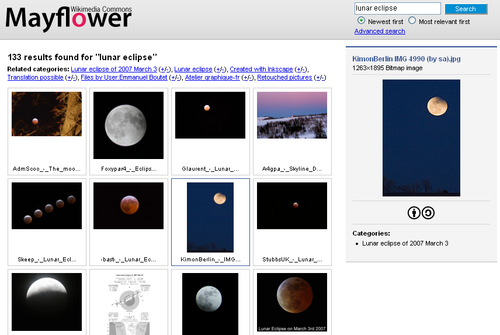
ユーザーがウェブにアクセスするためには、HTMLなどのコードを人間が読める形式に変換して表示するウェブブラウザが必要です。また、膨大な情報から目的のページを探し出すために、クローラーを用いてインデックスを作成する検索エンジンが不可欠な役割を果たしています。
さらに、ユーザーの利便性を高めるために、一時的にデータを保存するキャッシュや、ユーザーの状態を識別するためのクッキー(Cookie)といった技術が導入されています。一方で、検索エンジンのクローラーが到達できない領域は「ディープウェブ」と呼ばれ、一般的にアクセス可能な「サーフェスウェブ」とは区別されています。
ウェブ標準とガバナンス
ウェブが世界共通のプラットフォームとして機能し続けるためには、技術的な仕様の統一(標準化)が不可欠です。現在、以下の組織や文書が標準策定に寄与しています。
| 組織・グループ | 役割・提供するもの |
|---|---|
| W3C (World Wide Web Consortium) | ウェブの推奨仕様(Recommendations)の策定 |
| WHATWG | HTML Living Standardの策定 |
| IETF | RFC文書による通信プロトコルの定義 |
| ISO / Ecma International | 国際的な工業規格や技術標準の提供 |
| Unicode Consortium | 文字コードの標準化(Unicode) |
| IANA | ドメイン名や番号などのレジストリ管理 |
これらの標準化により、異なるメーカーのブラウザやデバイス間でも、同じウェブページが正しく表示される互換性が維持されています。また、障害を持つ人々がウェブを利用しやすくするための「アクセシビリティ」や、多言語対応のための「国際化」への取り組みも、W3Cなどの主導で進められています。
Frequently Asked Questions
インターネットとワールド・ワイド・ウェブは何が違うのですか?
インターネットは、世界中のコンピュータを繋ぐ物理的なネットワークインフラ(ハードウェアや基本プロトコル)のことです。一方、WWWは、そのインフラを利用してハイパーテキスト形式の情報を閲覧するためのサービス(アプリケーション)の一つです。
HTMLとは具体的にどのような役割を持つものですか?
HTML(HyperText Markup Language)は、ウェブページの構造を記述するためのマークアップ言語です。見出し、段落、リンク、画像などの要素をタグで囲むことで、ブラウザにコンテンツの構造を伝えます。
「ディープウェブ」とは危険な場所のことですか?
必ずしも危険な場所ではありません。ディープウェブとは、単に検索エンジンのインデックスに登録されていないページ(パスワード保護されたページ、データベースの検索結果、社内ネットワークなど)の総称です。その一部に意図的に隠蔽された「ダークウェブ」が存在しますが、ディープウェブ全体を指す言葉ではありません。
ウェブ標準がなぜ重要なのでしょうか?
標準がない場合、特定のブラウザでしか表示されないページが増え、情報の分断が起こります。W3Cなどが策定する標準に従うことで、どのようなデバイスやブラウザからアクセスしても、一貫したユーザー体験を提供することが可能になります。
References
- "Software release of WWW into public domain". 1993.
- "World Wide Web - MDN Web Docs Glossary: Definitions of Web-related terms | MDN". developer.mozilla.org. Retrieved 25 April 2023.
- Wright, Edmund, ed. (2006). The Desk Encyclopedia of World History. New York: . p. 312. .
- "What is the difference between the Web and the Internet?". W3C Help and FAQ. . 2009. Archived from the original on 9 July 2015. Retrieved 16 July 2015.
- "World Wide Web (WWW) launches in the public domain | April 30, 1993". HISTORY. 30 March 2020. Archived from the original on 6 February 2025. Retrieved 21 January 2025.
- Berners-Lee, Tim. "Information Management: A Proposal". w3.org. The World Wide Web Consortium. Archived from the original on 1 April 2010. Retrieved 12 February 2022.
- "The World's First Web Site". HISTORY. 30 August 2009. Archived from the original on 19 August 2023. Retrieved 4 August 2016.
- Bleigh, Michael (16 May 2014). "The Once And Future Web Platform". TechCrunch. Archived from the original on 5 December 2021. Retrieved 9 March 2022.
- "World Wide Web Timeline". Pews Research Center. 11 March 2014. Archived from the original on 29 July 2015. Retrieved 1 August 2015.
- Dewey, Caitlin (12 March 2014). "36 Ways The Web Has Changed Us". The Washington Post. Archived from the original on 9 September 2015. Retrieved 1 August 2015.
📸 フォトギャラリー